Summary
List of Q360 Online Learning Management System (“LMS”) Courses below – as of 2026/01.
Tips: Trainees with a LMS account credentials (e.g. obtained during or post Q360 implementation phase) may self-register to these courses from https://training.q360.com/catalog.
You may also view the video content from within a related business area “Procedures” or “Videos” section, as listed at the top of the Help Center.
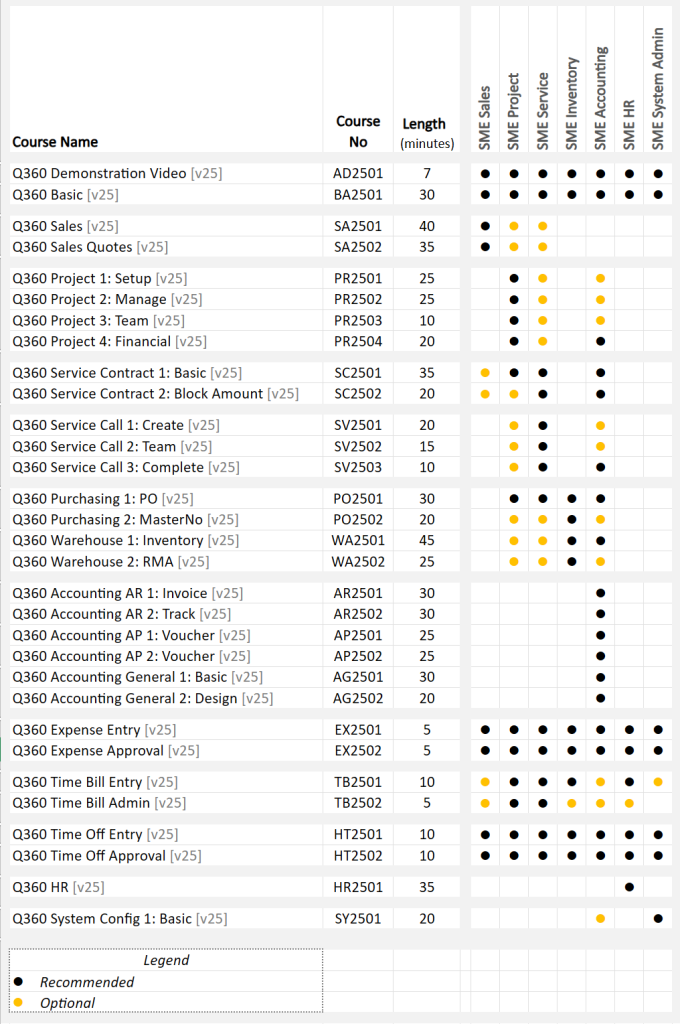
List of Online Course Names
Q360 v25+:
- AD2501 | Q360 Demonstration Video [v25] ~ 7 min
- BA2501 | Q360 Basic [v25] ~ 30 min
- SA2501 | Q360 Sales [v25] ~ 40 min
- SA2502 | Q360 Sales Quotes [v25] ~ 35 min
- PR2501 | Q360 Project 1: Setup [v25] ~ 25 min
- PR2502 | Q360 Project 2: Manage [v25] ~ 25 min
- PR2503 | Q360 Project 3: Team [v25] ~ 10 min
- PR2504 | Q360 Project 4: Financial [v25] ~ 20 min
- SC2501 | Q360 Service Contract 1: Basic [v25] ~ 35 min
- SC2502 | Q360 Service Contract 2: Block Amount [v25] ~ 20 min
- SV2501 | Q360 Service Call 1: Create [v25] ~ 20 min
- SV2502 | Q360 Service Call 2: Team [v25] ~ 15 min
- SV2503 | Q360 Service Call 3: Complete [v25] ~ 10 min
- PO2501 | Q360 Purchasing 1: PO [v25] ~ 30 min
- PO2502 | Q360 Purchasing 2: MasterNo [v25] ~ 20 min
- WA2501 | Q360 Warehouse 1: Inventory [v25] ~ 45 min
- WA2502 | Q360 Warehouse 2: RMA [v25] ~ 25 min
- AR2501 | Q360 Accounting AR 1: Invoice [v25] ~ 30 min
- AR2502 | Q360 Accounting AR 2: Track [v25] ~ 30 min
- AP2501 | Q360 Accounting AP 1: Voucher [v25] ~ 25 min
- AP2502 | Q360 Accounting AP 2: Voucher [v25] ~ 25 min
- AG2501 | Q360 Accounting General 1: Basic [v25] ~ 30 min
- AG2502 | Q360 Accounting General 2: Design [v25] ~ 20 min
- EX2501 | Q360 Expense Entry [v25] ~ 5 min
- EX2502 | Q360 Expense Approval [v25] ~ 5 min
- TB2501 | Q360 Time Bill Entry [v25] ~ 10 min
- TB2502 | Q360 Time Bill Admin [v25] ~ 5 min
- HT2501 | Q360 Time Off Entry [v25] ~ 10 min
- HT2502 | Q360 Time Off Approval [v25] ~ 10 min
- HR2501 | Q360 HR [v25] ~ 35 min
- SY2501 | Q360 System Config 1: Basic [v25] ~ 20 min
Q360 v24 and prior:
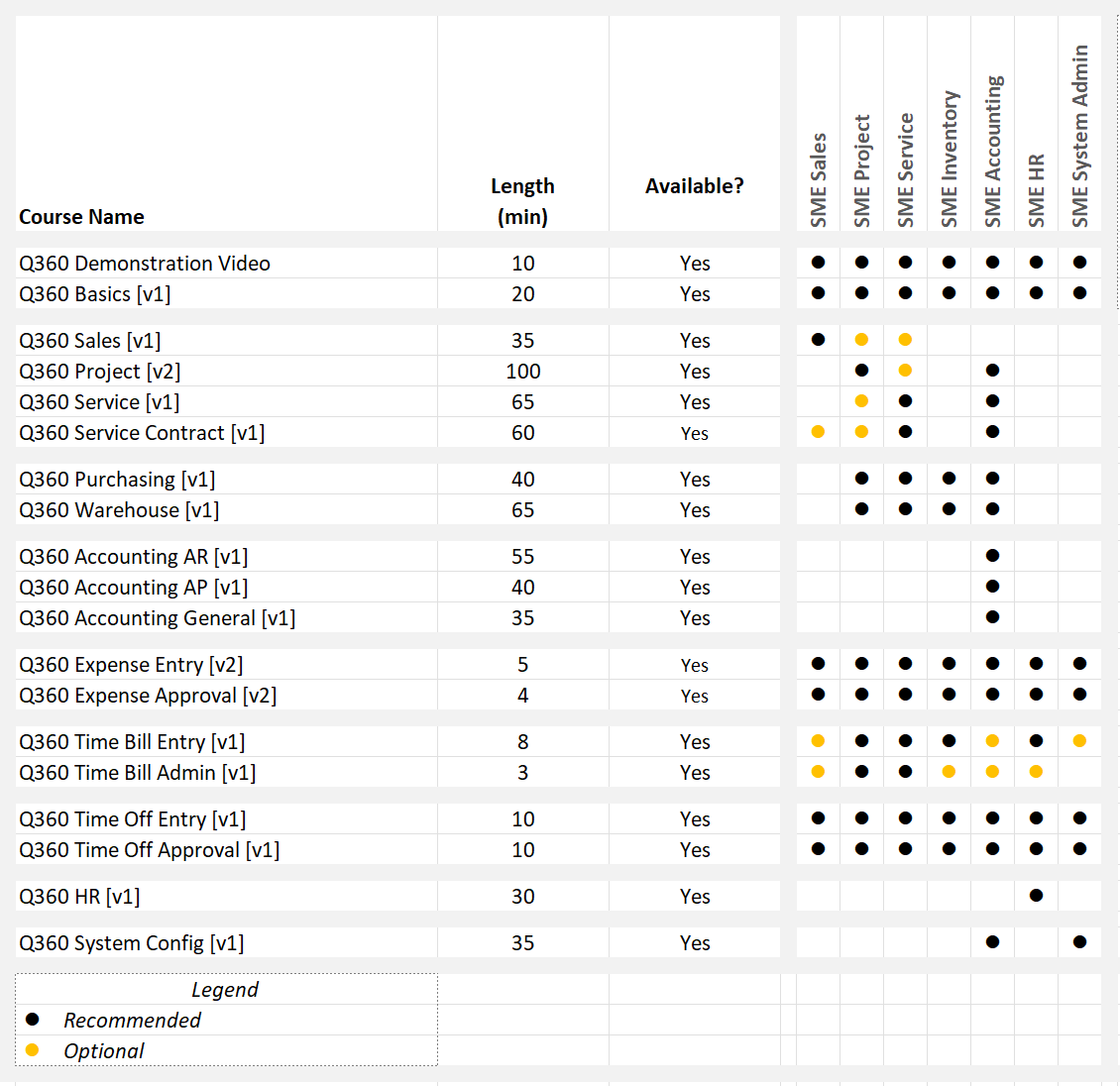
- Q360 Demonstration Video – 10 min
- Q360 Basics [v1] – 20 min
- Q360 Sales [v1] – 35 min
- Q360 Project [v2] – 100 min
- Q360 Service [v1] – 65 min
- Q360 Service Contract [v1] – 60 min
- Q360 Purchasing [v1] – 40 min
- Q360 Warehouse [v1] – 65 min
- Q360 Accounting AR [v1] – 55 min
- Q360 Accounting AP [v1] – 40 min
- Q360 Accounting General [v1] – 35 min
- Q360 Expense Entry [v2] – 5 min
- Q360 Expense Approval [v2] – 4 min
- Q360 Time Bill Entry [v1] – 8 min
- Q360 Time Bill Admin [v1] – 3 min
- Q360 Time Off Entry [v1] – 10 min
- Q360 Time Off Approval [v1] – 10 min
- Q360 HR [v1] – 30 min
- Q360 System Config [v1] – 35 min
Details
Q360 v24 and prior:
Q360 Demonstration Video – 10 min
|
Synopsis Preview an end-to-end operations flow illustrating Q360 as one unified system |
Q360 Demonstration Video [9:00] DEMO-01: Preview a Sample Process Flow in Q360 [9:00] |
Q360 Basics [v1] – 20 min
|
Synopsis 1: Q360 Web Client Basics 2. Learn about Grids and the many ways you can make sense of the data displayed in them |
Q360 Basics [18:13] SECTION 1: GET STARTED WITH Q360 NAVIGATION [11:32] |
Q360 Sales [v1] – 35 min
|
Synopsis 1: Q360 Prospect, Site, Contact, Opportunity 2. Q360 Sales Quote 3. Convert Q360 Sales Quote to Q360 Sales Order 4. Extended Q360 Sales Topics |
Q360 Sales [31:19] SECTION 1: Q360 PROSPECT, SITE, CONTACT, OPPORTUNITY [10:28] |
Q360 Project [v2] – 100 min
|
Synopsis 1.Get Started with a Q360 Project 2. Schedule and Assign Tasks 3. Once a project is underway, keep tabs on what needs to happen with Tasks and Schedules 4. Track time spent on the Project via Time Bill records against Project Task/SubTasks (or Task Assignments) 5. Initiate and track Customer or Internal Q360 Change Orders to add/remove/remove+add Order items from the Project 6. At any point during Q360 Project life cycle, monitor Project Profitability and review Project readiness to close 7. Prepare to transition to Service department 8. At the end of the project, get ready for the project financial close in Q360 |
Q360 Project [96:09] SECTION 1: GET STARTED WITH A Q360 PROJECT [23:52] |
Q360 Service [v1] – 65 min
|
Synopsis I. Initiate, track and resolve a Q360 Service Call II. Extended Q360 Service Topics |
Q360 Service [57:19] SECTION 1: GET STARTED WITH A Q360 SERVICE CALL [7:43] |
|
Synopsis Service Contracts in Q360 specify what is covered from a Service perspective. I. Create a Service Contract from Customer, Project, Sales Opportunity/Quote/Order including the setup of details and line items to define the service coverage. |
Q360 Service [57:19] SECTION 1: CREATE A SERVICE CONTRACT [22:24] Quiz |
Q360 Purchasing [v1] – 40 min
|
Synopsis I. Initiate a Q360 Purchase Order (“PO”) for procurement II. Q360 Inventory Level Terms III. Import and/or update MasterNo Price List |
Q360 Purchasing [32:02] SECTION 1: INITIATE A Q360 PURCHASE ORDER (“PO”) [8:22] |
Q360 Warehouse [v1] – 65 min
|
Synopsis I. Track what comes in and out of the Warehouse in Q360 II. Manage and track your Inventory III. Customer Return Merchandise Authorization (“RMA”) IV. Vendor Return Merchandise Authorization (“RMA”) for Inventory Stock |
Q360 Warehouse [56:06] SECTION 1: RECEIVE Q360 PURCHASE ORDER (“PO”) [3:46] |
Q360 Accounting AR [v1] – 55 min
|
Synopsis I. Depending on your process and type of jobs, create the appropriate invoice for your Service Calls, Projects, Service Contracts, Sales Orders or just a manual Customer Invoice. Once the “un-posted” invoice is created, print and post it – it is now ready to process against the cash receipt from customer. II. Manage your Accounts Receivables and track your collection activities as Customer Activities and the AR Collection Queue. Decide whether and when to escalate or write off invoices. III. Explore how to manage your Accounts Receivables and find what you need: |
Q360 Accounting AR [48:03] SECTION 1: CREATE ACCOUNTS RECEIVABLES [19:43] |
Q360 Accounting AP [v1] – 40 min
|
Synopsis I. Create Vendor Invoices, referred to as “Vouchers” in system for a Vendor, or for items received on a Purchase Order. II. Process Employee Expenses: post and pay expense claims whether reimbursable to employee or as part of credit card payment. III. Explore process for 2 common vendor purchase scenarios: IV. Find and view Journal Entries, Quick Views, Reports and Live Data for your Accounts Payables. |
Q360 Accounting AP [v1] [33:39] SECTION 1: CREATE ACCOUNTS PAYABLES [6:14] |
Q360 Accounting General [v1] – 35 min
|
Synopsis I. Perform the general accounting functions: Enter and post GL Journal Transactions, Perform Bank Reconciliation, Close Fiscal Periods, Close Fiscal Year. II. Be aware of the journal postings to be performed regularly for operations: Post Time Bill, Post Project Cost, Post Project Revenue, Create Project Closing Entry. II. Find and view Journal Entries, Quick Views, Reports and Live Data for your Accounting details, including how to create and run Balance Sheet and Income Statements. |
Q360 Accounting General [v1] [29:22] SECTION 1: ACCOUNTING GENERAL BASICS [9:38] |
Q360 Expense Entry [v2] – 5 min
|
Synopsis Create and Submit an Employee Expense Item. |
Q360 Expense Entry [v2] [1:55] EX-01: Create and Submit Employee Expense Item |
Q360 Expense Approval [v2] – 4 min
|
Synopsis Approve or Reject an Employee Expense Item. |
Q360 Expense Approval [v2] [1:25] EX-02: Approve or Reject Employee Expense Item |
Q360 Time Bill Entry [v1] – 8 min
|
Synopsis Enter Time in Q360 on Sales Opportunities, Project Tasks, Service Call. |
Q360 Time Bill Entry [07:01] SECTION 1: TRACK TIME ON A SALES OPPORTUNITY, PROJECT TASK, OR SERVICE CALL [02:32] |
Q360 Time Bill Admin [v1] – 3 min
|
Synopsis Learn how to Post Time Bill records – for users in your department or for an individual Time Bill record. |
Q360 Time Bill Admin [02:25] TB02: Post Time Bill record(s) [2:25] |
Q360 Time Off Entry [v1] – 10 min
|
Synopsis By the end of this course, you will be able to |
Q360 Time Off Entry [07:33] Visual Flow: Time Off Request |
Q360 Time Off Approval [v1] – 10 min
|
Synopsis Target Audience: Manager and HR professional – As a manager, approve the Time Off request submitted by the employee |
Q360 Time Off Approval [06:31] Visual Flow: Time Off Request – MGRSUBMIT status |
Q360 HR [v1] – 30 min
|
Synopsis Target Audience: Human Resources professional |
Q360 Time Off Entry [07:33] SECTION 1: GET STARTED WITH A CANDIDATE / EMPLOYEE RECORD [5:10] |
Q360 System Config [v1] – 35 min
|
Synopsis Target Audience: System Administrator or Power User with permission to perform system maintenance |
Q360 System Config [28:45] SECTION 1: DEFINE USER AND GROUP PERMISSION [10:05] |