This section describes the various time off procedures in Q360.
For detailed instruction, see sub topics to the left.
This section describes the various time off procedures in Q360.
For detailed instruction, see sub topics to the left.
Requesting time off in Q360 is handled through the HR Time Request modal. This is done by the Employee.
For detailed instruction, see sub topics to the left.
Submitted time requests go through the MGRSUBMIT, HRSUBMIT, and APPROVED statuses. The following diagram demonstrates the Q360 employee schedule status flow for time requests:
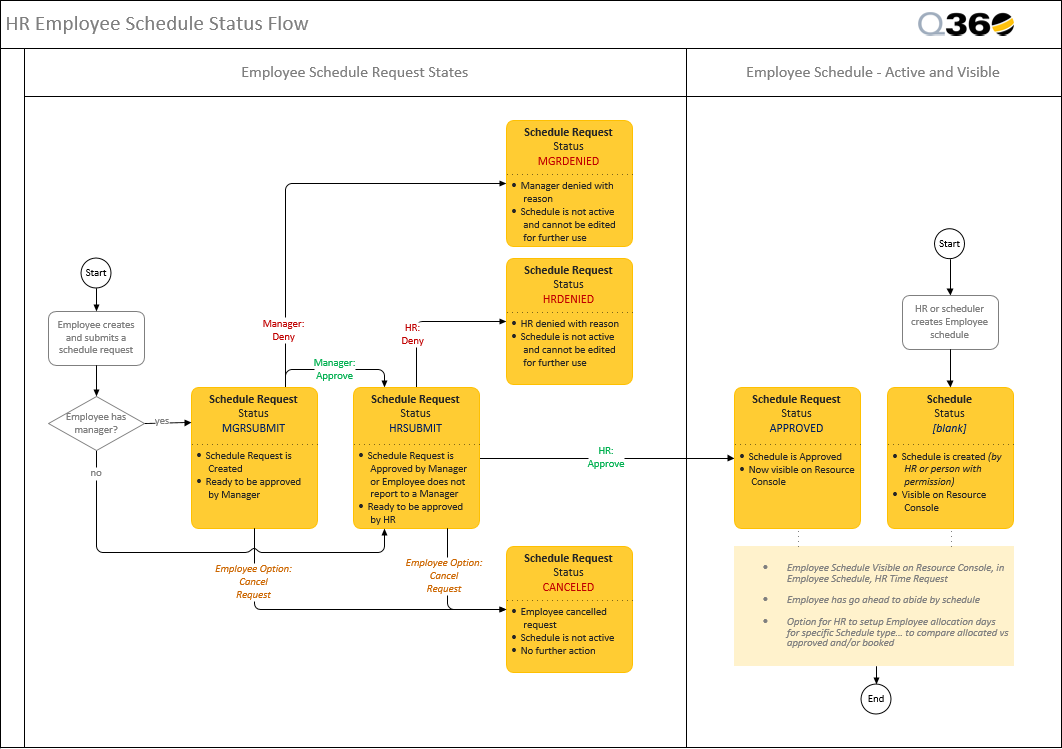
The HR Time Request form allows Users to view the time that is available for the them to take as well as upcoming time Requests that have been submitted
Time Off approvals in Q360 are handled through the Manager and HR Task List. This is done by the Employee’s supervisor initially, and then the HR representative.
For detailed instruction, see sub topics to the left.
Auto Approve Time Requests:
HR and / or Manager Approval may be set to Auto Approve from the General Code EMPSCHEDT using the Auto Approve column. Place the form in EDIT mode, double click inside the desired Auto Approve column cell, and select HR, MANAGER or BOTH dependent upon which approvals you wish to set to auto approve. When finished, SAVE the form.
Auto Approve time requests:
HR and / or Manager Approval may be set to Auto Approve from the General Code EMPSCHEDT using the Auto Approve column. Place the form in EDIT mode, double click inside the desired Auto Approve column cell, and select HR, MANAGER or BOTH dependent upon which approvals you wish to set to auto approve. When finished, SAVE the form