HubSpot Integrations with Q360
Purpose: The integration between HubSpot and Q360 offers a comprehensive solution for efficient data exchange, encompassing lead generation, contact list synchronization, and communication log tracking. This guide provides detailed insights into each integration aspect
Setup
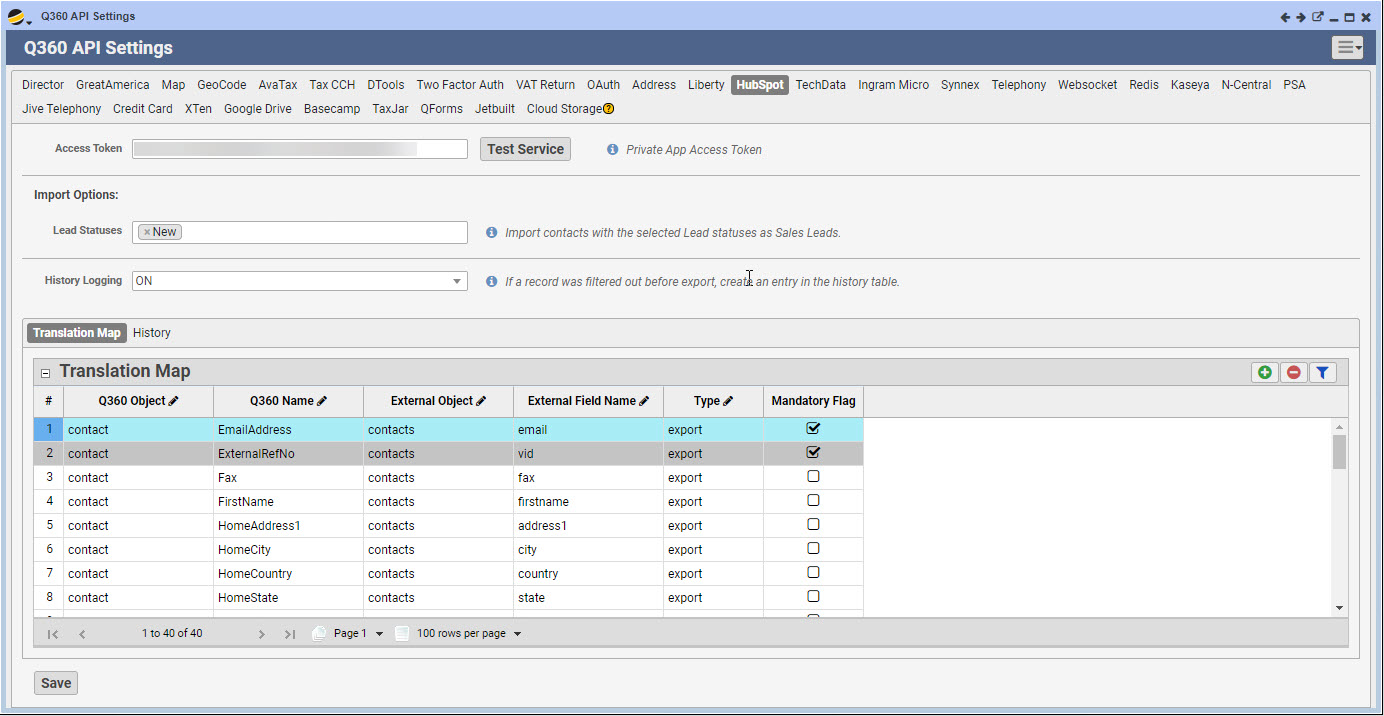
HubSpot API Configuration: Users obtain (from HubSpot) and input the Access Token into Q360 settings, enabling the integration with HubSpot
- Access Token: This token establishes a secure connection and allows data exchange between the two platforms
Lead Generation from HubSpot to Q360
The integration facilitates lead generation by capturing information from HubSpot forms and importing it into Q360 as sales leads
- Form Creation in HubSpot: Users may create forms within HubSpot, embedding them in emails, landing pages, or corporate contact forms
- Example: Forms may be designed to capture prospect information, such as email addresses and relevant details
- Configuration in Q360: Lead status and form fields are configured within Q360 for synchronization through APIs
- Define specific lead statuses in HubSpot to be pulled into Q360
- Map HubSpot form fields into Q360 sales leads
- Sync Process: The synchronization process initiates at set intervals to import leads from HubSpot into Q360 based on configured parameters
- Automated Integration: Once information is captured in HubSpot forms, the integration automatically imports it into Q360, streamlining the lead management process
- Recommended to be setup as an automated Background Job but can be done manually from the HubSpot API Configuration Extended Menu
Contact List Sync between Q360 and HubSpot
This integration enables the synchronization of contact lists from Q360 to HubSpot and facilitates automatic contact creation in HubSpot for those that do not already exist
Contact List Configuration
Users enable the integration on an individual contact list basis by adding the HubSpot integration to the Integrations tab of the contact list
- Objective: Contact list synchronization allows for effective email campaigns and performance tracking
- Campaign Management: Users manage mailing lists within Q360 and push them to HubSpot for targeted email campaigns
- Sync process: The synchronization process initiates at set intervals to update contact lists and add new contacts from Q360 into HubSpot
- Recommended to be setup as an automated Background Job but can be done manually from the HubSpot API Configuration Extended Menu
Communication Log Sync for Email Tracking
This integration logs and tracks communication sent from HubSpot, providing insights into email marketing performance within Q360
- Email Campaign Creation in HubSpot: Users may design and send marketing emails via HubSpot to the synchronized contact lists
- Data Synchronization: Q360 captures and displays the email interaction history of contacts, showcasing actions taken by recipients
- Recipient Engagement and Campaign Contact Log: Records recipient actions, including email opens, clicks, and other engagement
The HubSpot integration with Q360 offers a robust solution for lead management, 1-way contact synchronization, and email tracking. By leveraging this comprehensive integration, businesses can streamline workflows, improve data accuracy, and enhance customer engagement across both platforms
For additional information: